The AnyLogic Technical Support Team works with users’ simulation models every single day. We see everything—from well-structured models with clear logic and solid simulation verification to projects that suddenly become unreliable right before a deadline.
While every project is unique, the same simulation design mistakes appear again and again. Some of them cause immediate errors. Others are more dangerous: they silently undermine simulation verification and only reveal themselves when results stop making sense or stakeholders lose confidence in the model.
If something feels wrong with your simulation design, chances are one of these issues is hidden inside your model. Let’s go through the most common ones and see how to fix them.
Contents:
- "Copy-paste" flowchart nightmare
- "Agent zoo" and class hierarchy
- The Java Trap: == vs. equals()
- "Microscope fallacy" or wrong level of abstraction
- "Now you see it, now you don't," or reproducible runs
- The mystery of var1 and other crimes against clarity
- Final thoughts
"Copy-paste" flowchart nightmare
One of the most frequent simulation design issues we encounter is large flowcharts created by copying and pasting the same thing over and over again.

Typically, this happens when a modeler tries to handle slightly different scenarios by duplicating entire blocks, for example, pedestrians going from different start points to various destinations.
At first glance, this approach feels fast. But in reality, it creates fragile models that are extremely hard to debug, maintain, and verify.
From a simulation verification perspective, this is risky. When logic is duplicated many times, it becomes nearly impossible to ensure consistent behavior across all flowchart branches. One small mistake in a single block can compromise results, and you may never notice it.
Tip: Parameterize your logic
Instead of hard-coding destinations into each block, use dynamic properties and functions. The same behavior can often be implemented with just a few blocks and a couple of destination functions.
For example, it is sufficient to parameterize the Target line fields of the pedSource and pedGoTo blocks and assign this value through custom functions:

Just see how compact and elegant the monstrous flowchart with the same logic becomes.

This approach dramatically improves readability and makes simulation verification much easier. When logic is centralized, it can be tested, verified, and adjusted with confidence.
"Agent zoo" and class hierarchy
Another common simulation design mistake is creating too many agent types.
When opening a project tree, we often see agent types like TruckRed, TruckBlue, CarSedan, CarHatchback, LorrySmall… Usually users create new agent types when they need to introduce another visualization (a new 3D or 2D figure that represents agents).
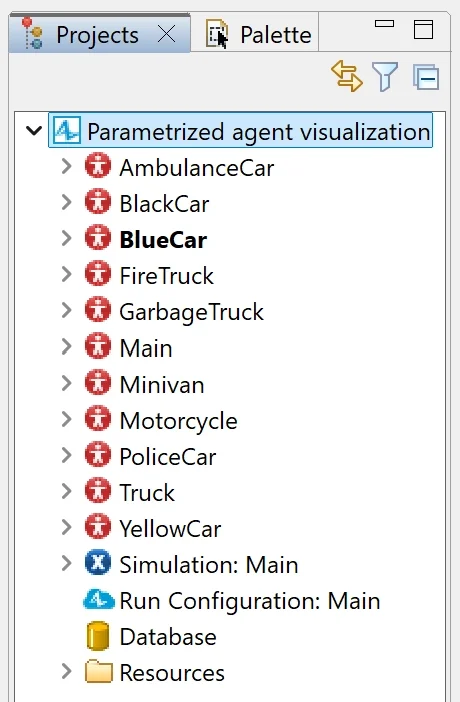
The first question that pops into our head is: do these agents actually behave differently?
In most cases, the answer is no.
The agents might look different, but their behavior is identical. From a simulation model development standpoint, this over-engineering adds unnecessary complexity.
Tip: One agent, different parameters
If a red truck behaves exactly like a blue truck, they should be the same agent type. They are just Vehicle classes with different parameters.
For example, a model contains 10 different agent types (excluding Main), all of which can be consolidated into a single agent with dynamic presentation. This simplifies simulation model design and improves simulation verification, because behavior is defined and tested in one place.

The easiest solution is to include all required visual shapes in one agent and control their visibility using a parameter such as vehicleType. Visual differences remain, while logic stays consistent and verifiable.

Every agent type defines a separate Java class. Loading 50 different classes puts unnecessary strain on the JVM (Java Virtual Machine) and consumes memory. A single class with boolean visibility toggles is computationally much lighter.
Note: By following this principle, you may never hit the limitation of 10 agents in AnyLogic Personal Learning Edition!
The Java Trap: == vs. equals()
This mistake looks minor, but it causes a surprisingly large number of silent errors.
In Java, comparing strings with == instead of equals() sometimes works… and sometimes doesn’t. When it doesn’t, your model doesn’t crash; it just behaves incorrectly. This is especially dangerous for simulation verification. Your model runs, produces results, and looks fine, but those results are wrong.
As you may have noticed in the previous example, we compared the “vehicleType” string parameter to the name of the vehicle type. You might write vehicleType == "Car," and sometimes it works... but often it fails silently, breaking your model logic in unpredictable ways.
Tip: Always use equals() for objects
In Java, == checks if two objects are literally the same instance in memory. The equals() function checks if the content of the objects is the same. Think of it like house keys:
- == asks: "Is this the exact same physical key?"
- equals() asks: "Does this key open the same door?"
If simulation verification produces unexpected results and the logic looks correct, this is one of the first places to check.
"Microscope fallacy," or wrong level of abstraction
The next mistake is very important and surely deserves a spot here. We mean the most frequent model design problem—determining the purpose of the model and the level of abstraction.

AnyLogic is a multi-scale, multimethod simulation software. Our industry-specific libraries are designed to simulate processes common to a particular application area with the appropriate level of precision.
For example, when building a supply chain model, simulating detailed physical movement inside a warehouse often adds no value. These details rarely affect delivery time but significantly increase complexity and slow execution, making simulation verification harder.
Clearly defining the models’ objectives and choosing the right scale is critical. This decision directly affects performance, credibility of results, and the feasibility of simulation verification.
Tip: Match the model to its purpose
Ask yourself early:
- What decisions will this model support?
- What level of detail affects the outcome?
In many cases, a simple delay represents internal processes just as accurately as detailed movement logic, with far less risk and much better testability.
Read also: 6 Tips for simulation project success
"Now you see it, now you don't," or reproducible runs
Our next point is all about the development and debugging processes of the model. During the development process it is usual to have logical problems and conflicts. If you can’t reproduce behavior, you can’t debug it. And if you can’t debug it, you can’t trust your results.
Imagine a traffic jam that appears in one out of ten runs. You know something is wrong, but you cannot reproduce it consistently.
Tip: Make your runs reproducible
Control randomness, random seeds, and initial conditions. Reproducibility is a cornerstone of simulation verification. If results change every time the model runs, stakeholders will lose trust, even if the logic is correct.
How to achieve reproducible model runs? Check our detailed help guide to succeed.
The mystery of var1 and other crimes against clarity
Finally, let’s talk about naming.
Simulation models contain many elements: agents, blocks, parameters, functions, and events. Poor naming does more than reduce readability; it directly affects simulation verification.
When issues appear and results look suspicious, unclear names slow down debugging and increase the risk of incorrect fixes.
Tip: Use clear, consistent naming conventions
How can you benefit from proper naming? Well, there are some advantages:
- Makes logic easier to follow.
- Speeds up debugging.
- Supports long-term maintenance and validation.
A well-named model is easier to validate, easier to explain, and much harder to break accidentally.
If you look for the best practices on naming the AnyLogic model elements, please check our naming convention.
Mistakes are part of becoming a better modeler
Everyone makes simulation design mistakes—even experienced professionals. The difference lies in recognizing patterns early and understanding how they affect simulation verification.
If your simulation crashes, don’t panic. In many cases, the issue isn’t the idea behind the model, but how it was implemented. If you recognize your own patterns in any of these points, don't worry! It means you are on the way to becoming a better modeler.
If you need help reviewing your simulation design, our team is always happy to help.
Need more help learning AnyLogic or improving your skills with expert guidance? Check our upcoming webinar on simulation-based optimization in AnyLogic.